Modbus Mapping
What you will find in this section:
Modbus mapping
The EMpro offers the option of mapping various registers to a defined contiguous Modbus register area.
This allows multiple registers from different address spaces to be retrieved in a single read command.
- The contiguous area comprises 125 registers, as this is the maximum number of registers that can be read in one read command
- The mapping is implemented at register level, independent of data points and data types
The 125 mapped register addresses - starting at register 57.600 (Hex: 0xE100) – can only be read by the user.
The assignment of content for these registers takes place in the 125 registers starting at 57.344 (Hex: 0xE000) and is also possible via the web server. Configuration via the display is not provided.
Example:
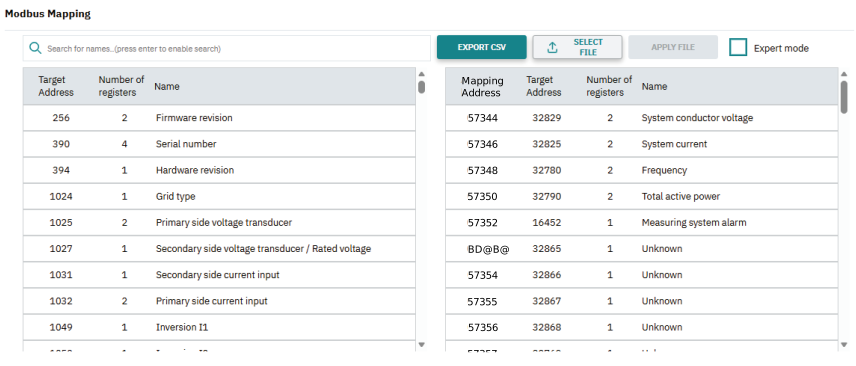
The system conductor voltage (register: 32.829), the system current (register: 32.825), the frequency (register 32.780), the total active power (register 32.790) and the measuring system alarm (register: 16.452) are to be received via one read command.
- For this it is necessary to store the registers to be mapped in the allocation registers. The number of registers to transfer a value depends on the data type. All register addresses must be stored in the allocation registers.
57.344: 32.829
57.345: 32.830
57.346: 32.825
57.347: 32.826
57.348: 32.780
57.349: 32.781
57.350: 32.790
57.351: 32.791
57.352: 16.452
- The format of query must then be set according to the configured input data in the mapped register addresses.
57.600 → 32 Bit Float (little endian byte swap)
57.602 → 32 Bit Float (little endian byte swap)
57.604 → 32 Bit Float (little endian byte swap)
57.606 → 32 Bit Float (little endian byte swap)
57.608 → 16 Bit Integer (little endian byte swap)
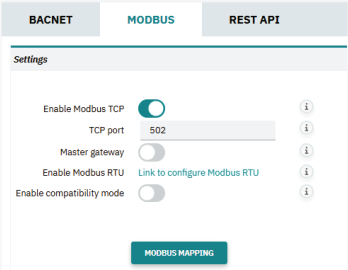
The register assignment can be made via Modbus or web server. You can access these settings via the web server by going to Network settings > Protocols > Modbus and clicking on the “Modbus mapping” button.
The registers to be mapped can be determined using the search function and transferred to the mapping address area using drag and drop mechanism. The assignment made can be exported as a CSV file. An existing assignment file can be imported.